Dive Subtitle Generator
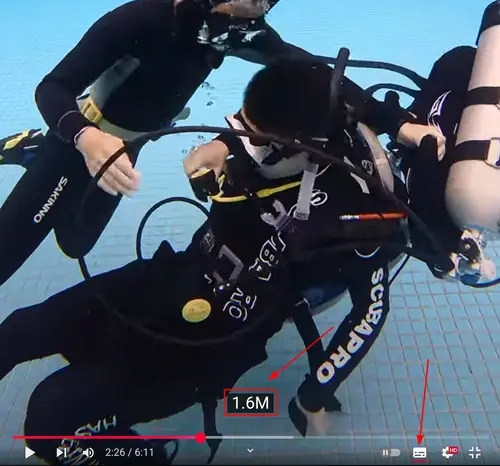
All Morning Dive's videos have subtitles displaying real-time depth, which is convenient for review in subsequent training sessions. In the video below, with subtitles enabled, you can clearly understand the depth changes of the diver when deploying an SMB.
The equipments from we are an Insta360 camera and Garmin Descent G1, and we use self-developed programs to generate subtitle files. Now we've made these tools into a web version for divers to use conveniently.
Here are the specific steps:
1. Get the original video file
The easiest way is to get it from the SD card, the file will be at this path:
/DCIM/Camera01/VID_20250907_100705_00_015.insv
If your video has already been transferred to your phone, on Android phones it will be at this path:
/Android/data/com.arashivision.insta360akiko/files/Insta360OneR/galleryOriginal/X4/Camera01/VID_20250907_100705_00_015.insv
2. Get the FIT file
Open Garmin Dive, enter the specific dive session, then from the "⋮" menu in the upper right corner, export the dive activity as a FIT file.
3. Open the website and generate the SRT subtitle file
Transfer both files from the above two steps to your computer, open the web version of the subtitle generator, upload both files, then click the Generate button to download the corresponding SRT subtitle file for the video.
4. Upload the subtitle file
In the YouTube Creator Studio video editor, you can upload the subtitles, and you're all done.
This is how we create depth subtitles. We will continue to develop further programs in the future. If you have different equipment or requirements and need our help, please feel free to contact us.